What you get for a color design
Upload your design and set Package mode to Color, or leave it on Auto and Tattoo Pack picks the mode from the design. Choose an ink brand and tap Build package. A color package holds four sheets:
- Palette breakdown: the dominant colors, the tonal structure, and the share of the design each color covers, grouped into warm, cool, neutral, and dark, in that order.
- Ink breakdown: the closest inks from your chosen brand, used straight or cut with white, with the share of the design each one covers. It ends with an ink list of the bottles you need.
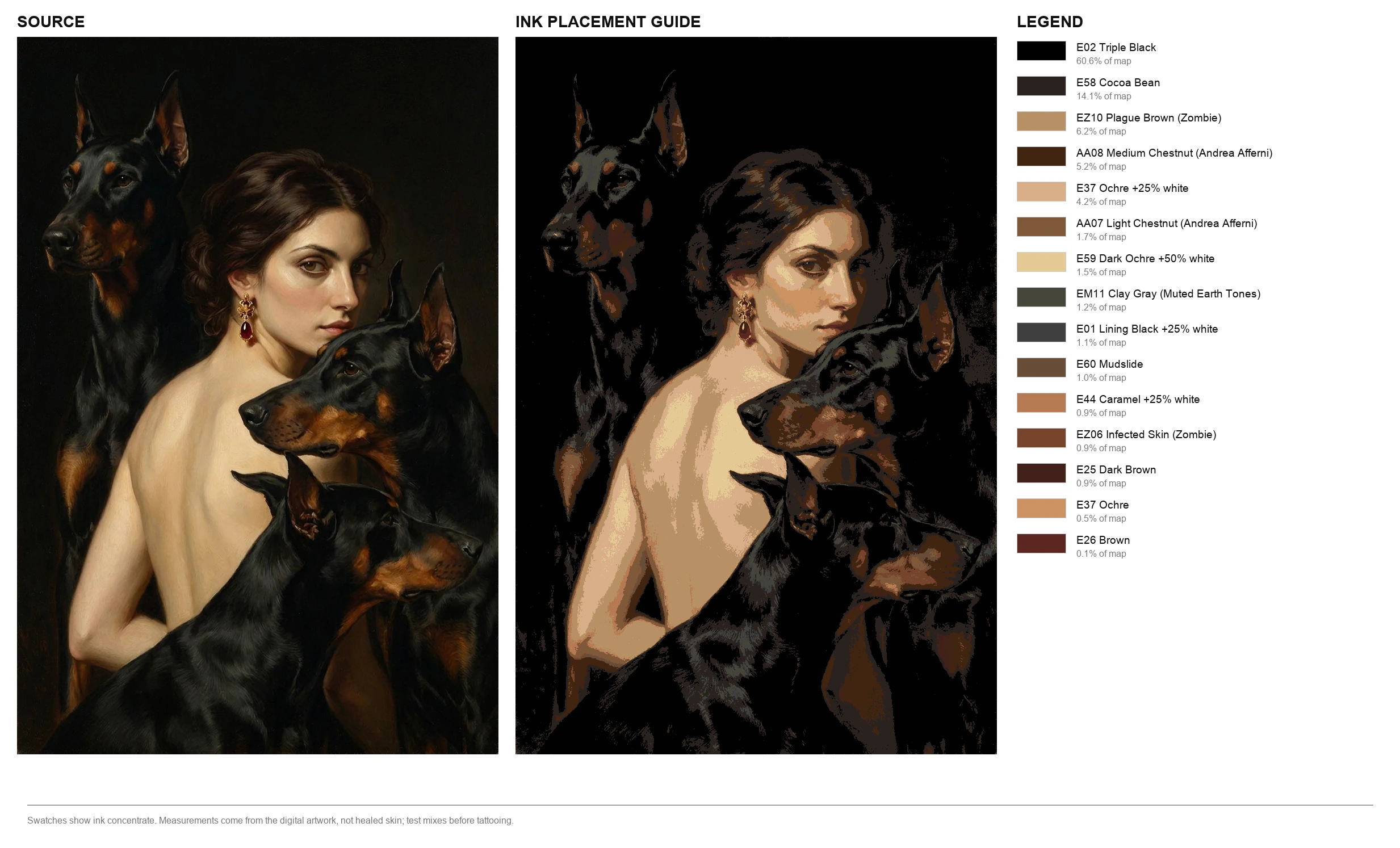
- Ink map: where to use each ink on the design.
- Tone map: a light-to-dark guide, so values stay readable while you work.
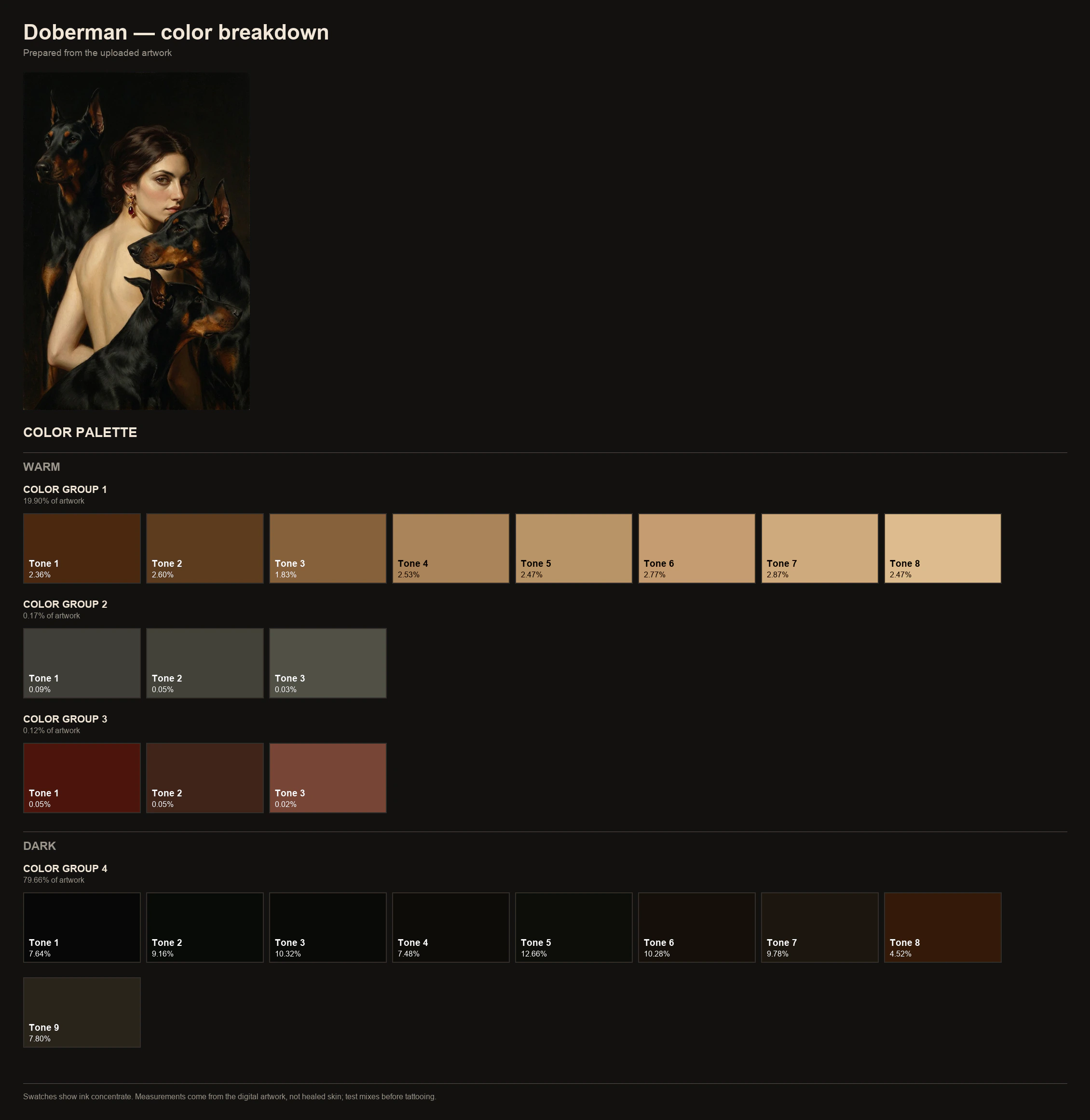
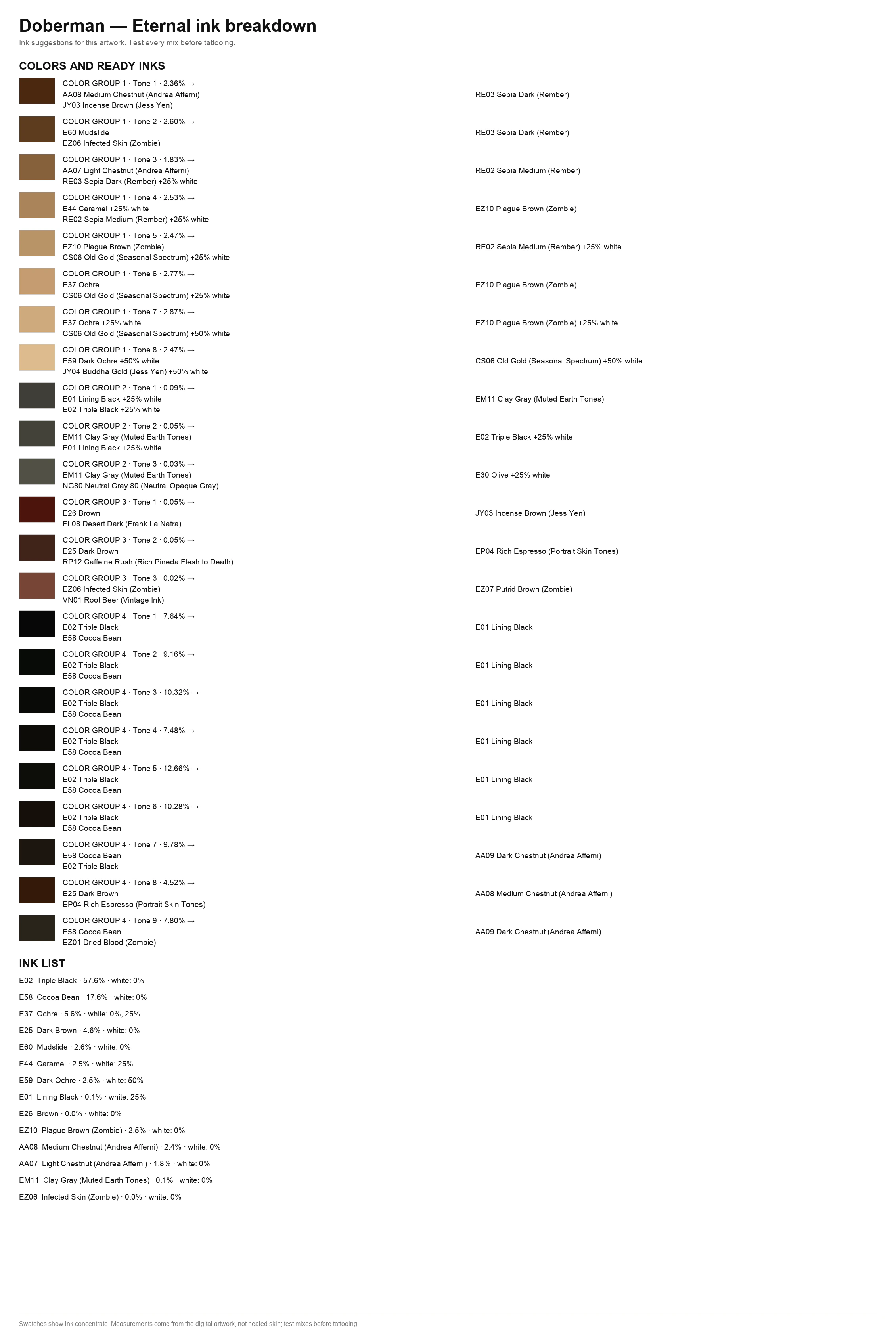
Same group numbers on both breakdowns
Colors are sorted into numbered groups: COLOR GROUP 1, 2, 3, and so on. The same numbers appear on the palette breakdown and on the ink breakdown, so you can go back and forth between the two without losing track of a color.
Four ink brands, 1,113 colors
You pick one brand per package; to see the same design in another brand, build a second package with that brand. The brand list on the upload form shows how many colors each brand has:
- Eternal: 290 colors. That is the 67 standard colors plus 223 from 20 Eternal series and sets, like Portrait Skin Tones, Muted Earth Tones, Zombie, Jess Yen, and Motor City.
- Intenze: 292 colors.
- Solid Ink: 175 colors.
- World Famous: 356 colors.
Eternal series bottles keep their series name
When a bottle from an Eternal series shows up in your ink breakdown, it carries its series name, so you know which set it comes from.
How a color becomes a bottle
Tattoo Pack reads the colors of the file you upload, groups them, and for each color looks for the closest ink in your brand, used straight from the bottle or cut with white. The ink list then shows how much of the design each bottle covers.
Treat the result as a starting point for your mixes. The sheet says it plainly: Ink suggestions for this artwork. Test every mix before tattooing.
When no bottle is close enough
Some colors have no close match in a given brand. In that case, the sheet does not fall back to the nearest bottle. That color is marked No ready ink, with its share of the design, so you know it is a mix you make yourself.
Swatches show ink concentrate, not healed skin
The sheet cannot show how a color will heal in a particular client's skin, and it says so on the sheet itself:
Swatches show ink concentrate. Measurements come from the digital artwork, not healed skin; test mixes before tattooing.
The stencil comes from the same upload
You make the stencil on the same package page. Sign in with a code we email you, and you get 2 free 1K stencils a day. Read how to make a tattoo stencil from your design, then print it at actual size.
Questions about ink matching
Which ink colors do I need for this tattoo?
Build a color package with your brand. The ink list at the end of the ink breakdown names each bottle, the share of the design it covers, and whether it is cut with white.
Which brands can I match my design to?
Eternal, Intenze, Solid Ink, and World Famous: 1,113 colors across the four brands. You pick one brand per package.
Can I get a color palette from any image?
Yes, as long as it is a PNG, JPEG, or WebP up to 25 MB. The breakdown reads the colors in the file itself, so upload the finished digital design.
Does the swatch show how the color will look healed?
No. Swatches show ink concentrate, and the colors come from the digital artwork, not healed skin. Test mixes before tattooing.
What if my brand has no bottle close to a color?
The sheet marks that color No ready ink instead of faking a match, so you know to mix it.
Does it match inks for black-and-gray work?
No. A black-and-gray package has tone maps in 5 and 3 steps and no ink breakdown; the stencil is made the same way, after sign-in. Set Package mode to Black and gray, or leave it on Auto.
How long are the sheets available to download?
Files are available to download for 24 hours after you build the package. For what is stored and for how long, see the privacy policy.
Related guides
Try it on your design
Match my designFree with no account and no email. Only the stencil needs sign-in.